The Self-Hosted Homelab - Part 1 - Hardware
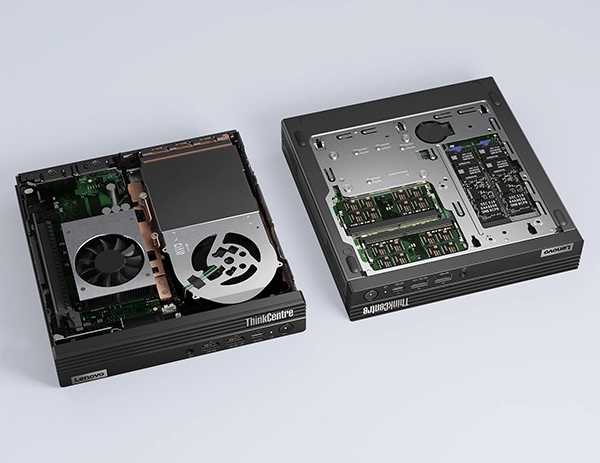
Table of Contents
Around 2015, I was working in Paris for Renault at the Technocentre (France’s biggest Research & Development center). I remember a coworker talking to me about the release of the new Raspberry Pi and being so enthusiastic and hyped up about all the possible projects he could start with such a cheap and tiny single-board computer. I didn’t have any projects in mind back then and didn’t explore much what these computers could do for me up until I was gifted one in 2022, a Raspberry Pi 4 Model B 2 GB.
The very first thing I did on it was installing Adguard Home to block ads and trackers at the DNS level, paired with Tailscale to give me the ability to use my homeserver as my DNS on my phone when I’m not home. I later set up a cron job to run a python script every day at 5 AM to automatically book gym classes for me based on my gym routine. Everything mostly worked but the 2 GB of RAM quickly felt restrictive.
I turned to the /r/selfhosted and /r/homelab communities on Reddit and started to read every post. A lot of people were asking the same question I was asking myself: where do I start hardware-wise when you have outgrown your Raspberry Pi? One of the most prominent answers was: “Use what you already have!”, like an old laptop that is gathering dust. I had one that fitted the bill, but didn’t see myself using it as a server because of its form factor. I wanted a small box that I could open up, upgrade any parts if I wanted to, with no built-in screen/keyboard.
Up next was a category of hardware I didn’t really know about until I started to really look into it: Tiny PCs.
Tiny PCs
Tiny PCs are energy efficient, small (the size of a thick paperback book), and can be opened to upgrade the RAM or NVMe/SSD drives. They are fantastic for home servers and are somewhat cheap on the second-hand market as a lot of businesses are selling them after an upgrade cycle. The top 3 options are the Lenovo ThinkCentre/ThinkStation, HP EliteDesk/ProDesk, and the Dell OptiPlex Micro.
In terms of specs, the recommended sweet spot right now is an Intel 8th gen CPU (i5-8500T) or newer, with 8 GB of RAM (more is better), and 256 GB of storage (again, more is better). Why the 8th generation for the Intel CPU and especially the 8500T version? More cores, more threads, and a much lower thermal/power envelope.
Here’s a table comparing the 6th, 7th, and 8th generation of Intel CPUs and their variants.
| Generation | CPU | Cores / Threads | Base Clock Speed | Turbo Clock Speed | Cache | TDP | iGPU |
|---|---|---|---|---|---|---|---|
| 6th | |||||||
| 6th | i5-6500 | 4 / 4 | 3.2 GHz | 3.6 GHz | 6 MB | 65 W | HD 530 |
| 6th | i5-6500T | 4 / 4 | 2.5 GHz | 3.1 GHz | 6 MB | 35 W | HD 530 |
| 6th | i7-6700 | 4 / 8 | 3.4 GHz | 4.0 GHz | 8 MB | 65 W | HD 530 |
| 6th | i7-6700T | 4 / 8 | 2.8 GHz | 3.6 GHz | 8 MB | 35 W | HD 530 |
| 7th | |||||||
| 7th | i5-7500 | 4 / 4 | 3.4 GHz | 3.8 GHz | 6 MB | 65 W | HD 630 |
| 7th | i5-7500T | 4 / 4 | 2.7 GHz | 3.3 GHz | 6 MB | 35 W | HD 630 |
| 7th | i7-7700 | 4 / 8 | 3.6 GHz | 4.2 GHz | 8 MB | 65 W | HD 630 |
| 7th | i7-7700T | 4 / 8 | 2.9 GHz | 3.8 GHz | 8 MB | 35 W | HD 630 |
| 8th | |||||||
| 8th | i5-8500 | 6 / 6 | 3.0 GHz | 4.1 GHz | 9 MB | 65 W | UHD 630 |
| 8th | i5-8500T | 6 / 6 | 2.1 GHz | 3.5 GHz | 9 MB | 35 W | UHD 630 |
| 8th | i7-8700 | 6 / 12 | 3.2 GHz | 4.6 GHz | 12 MB | 65 W | UHD 630 |
| 8th | i7-8700T | 6 / 12 | 2.4 GHz | 4.0 GHz | 12 MB | 35 W | UHD 630 |
Where to buy them?
I’m based in Toronto (Canada) so my main options are the following:
- Amazon
- eBay
- Facebook Marketplace
- Kijiji (owned by eBay, similar to Marketplace but less active. You can find some good deals though)
I bought my first one off of Marketplace but it was from a local business. Most of the listings on Facebook are from businesses buying them in bulk and reselling them at a premium.
The second one I bought was an incredible deal I found on Kijiji. The seller even delivered it to my place at no additional cost and gave me a 32 GB recovery USB key (as he’d installed Windows 11 on it).
I didn’t find the listings on eBay competitive enough versus local offers on Marketplace/Kijiji when you have to add tax and delivery so I don’t really look there.
At what price?
That’s where things have changed a lot recently and not in a good way.
In Canada, most of the resellers are buying in bulk from the US and are reselling them here. Add into the mix the RAM and SSD nightmare prices because of Big Tech gobbling up all the world’s RAM production that they need to build new AI datacenters and you have a recipe for higher prices.
Consumers are turning to the second-hand market for cheaper RAM, SSD, and PC prices and some resellers came up with a new business model by not including RAM and SSD in their listings. You can buy them separately, but at a premium.
Here’s what I bought and when. These prices are my baseline, even in 2026 with all the price increases everywhere.
- June 2025 (Marketplace)
- Lenovo ThinkCentre M720q - i5-8500T/8 GB RAM/256 GB NVMe
- $220 + tax for a total of $248.50 CAD (6-month warranty)
- Lenovo ThinkCentre M720q - i5-8500T/8 GB RAM/256 GB NVMe
- October 2025 (Kijiji)
- Lenovo ThinkCentre M80q
- i5-10500T/16 GB RAM/512 GB NVMe
- $300 CAD
- i5-10500T/16 GB RAM/512 GB NVMe
- Lenovo ThinkCentre M80q
These prices are entirely dependent on my local market and shouldn’t mean anything to you (unless you also live in Toronto) other than giving you a vague idea of the pricing here. To have a better picture of the prices in your area, go on Marketplace every day for a few weeks and check what is available to create a price baseline and then try to find good deals.
Why the Lenovo ThinkCentre/ThinkStation?
The YouTube channel ServeTheHome ran a series in 2020 called Project TinyMiniMicro to find the best unit in each category. On their forums, you can find detailed threads for each model. The Lenovo ThinkCentre/ThinkStation Reference Thread was super helpful to know which model to buy based on the minimum specs I outlined above.
A quick note on branding, since even I found it confusing at first:
- Lenovo ThinkCentre = Business/office PC, limited expansion
- Tiny (M720q, M920q, M75q, …)
- All-in-one (AIO)
- SFF
- Towers
- Lenovo ThinkStation = Professional workstation, can support more RAM, optional graphics card, more expansion capabilities
- Tiny (P340, P350, P360)
- All-in-one (AIO)
- SFF
- Towers

I wanted an M720q or an M920q because these tiny PCs have an additional PCIe slot that could be useful down the road. It’s nice to have the option. I ended up choosing the M720q for my first one based on that and because it’s what was most available in my local market. If you have more HP EliteDesk/ProDesk and Dell OptiPlex Micro in your local market, you can’t go wrong.
You have space and want to add more SSDs and a GPU
Lenovo is also selling workstations with bigger chassis under the SFF (small-form factor) name.
They are bigger than a tiny PC but smaller than a tower and there are tons of them on Marketplace and they are cheap! They are less attractive because you can’t really stack them on your desk, they consume way more electricity, and are louder than their tiny PC brothers.
You can find SFF PCs under both the ThinkCentre and ThinkStation brands.
MiniPCs/NUCs
The second category is Mini PCs and NUCs (Next Unit of Computing).
There’s a lot of competition in that market and it’s quite hard to navigate all the options. The /r/minipcs community is very active on Reddit and they have a very handy guide in the form of a public spreadsheet with a loooot of options and price points. It’s US-centric but you can use it as a reference guide for your market.
Beelink and Minisforum are popular mini PC manufacturers from Shenzhen, China. These are good options if you want new compact hardware, and are not annoyed by hardware you won’t be able to upgrade.
If you are in the US, a guy named Luke shared on HackerNews a website he created to help you find good deals on Amazon: MiniPCs.zip. All links are affiliates. No, I do not get a cut, but I found the website useful to visually see the options available.
Raspberry Pi
Raspberry Pis have become much more powerful over the years, but following a massive price hike (plus the cost of the SD card/charging cable, and accessories), they are no longer an obvious choice versus the price of much more capable tiny PCs. A used i5-8500T Tiny PC with 8-16 GB RAM can be a much more attractive option as a general-purpose server.
If you have a specific IoT or low-spec project and can grab one for cheap on Marketplace (there are a lot of them sitting unused in drawers and a lot of people are reselling them), go for it! Having said that, I do think you’ll be better off buying a tiny PC that will be much more future-proof if your goal is to self-host a homelab.
So, what should you buy?
At the end of the day, there’s no perfect answer, only trade-offs.
I went the tiny PC route because I wanted something upgradable, small but capable, and I didn’t mind spending a bit of time hunting for deals on Marketplace. If that sounds tedious to you, grabbing a new Beelink or Minisforum box will get you there faster for a bit more money.
Whatever you end up going, don’t hesitate to ask around before pulling the trigger.